Choosing a phone plan often comes down to one question: how much data do I need? Pick too little and you'll face overage charges or throttled speeds. Pick too much and you're wasting money. This guide helps you calculate your actual data needs and understand what unlimited data really means.
Understanding Mobile Data
Mobile data is the internet connection your phone uses when you're not connected to Wi-Fi. Every time you stream a video, scroll social media, or load a webpage outside your home, you're using mobile data.
Data is measured in megabytes (MB) and gigabytes (GB). For reference:
- 1,000 MB = 1 GB
- The average smartphone user consumes about 17 GB per month (as of 2026)
But averages don't tell the whole story. Your actual usage depends on your habits, how often you're on Wi-Fi, and which apps you use most.
How Much Data Do Common Activities Use?
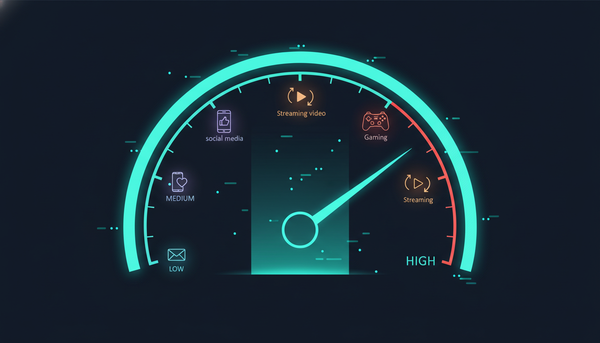
Here's a breakdown of data consumption by activity:
Streaming Music
| Quality | Data Per Hour |
|---|---|
| Low (96 kbps) | 43 MB |
| Normal (160 kbps) | 72 MB |
| High (320 kbps) | 144 MB |
Streaming music for an hour at normal quality uses about 72 MB. If you listen to 2 hours daily, that's about 4.3 GB per month.
Streaming Video
| Quality | Data Per Hour |
|---|---|
| SD (480p) | 1 GB |
| HD (720p) | 2-3 GB |
| Full HD (1080p) | 4-6 GB |
| 4K | 15-25 GB |
Video is the biggest data consumer. One hour of Netflix at HD quality uses 2-3 GB. Watch an hour daily at HD and you'll use 60-90 GB per month on video alone.
Social Media
| Platform | Data Per Hour |
|---|---|
| 720 MB | |
| TikTok | 840 MB |
| 400 MB | |
| Twitter/X | 300 MB |
| 300 MB |
Social media, especially video-heavy platforms like TikTok and Instagram, uses more data than many people expect.
Video Calls
| Platform | Data Per Hour |
|---|---|
| Zoom | 540 MB - 1.62 GB |
| FaceTime | 180 MB |
| Google Meet | 810 MB |
| Microsoft Teams | 720 MB |
Video calls use moderate amounts of data. HD video calls use significantly more than standard quality.
Other Activities
| Activity | Data Usage |
|---|---|
| Email (text only) | 20 KB per email |
| Email (with attachments) | 1-10 MB per email |
| Web browsing | 30-100 MB per hour |
| Navigation (Google Maps) | 5-10 MB per hour |
| Podcast streaming | 30-100 MB per hour |
| Online gaming | 40-150 MB per hour |
Navigation and gaming use relatively little data, while image-heavy websites can add up quickly.
Calculate Your Monthly Data Needs
Use this worksheet to estimate your monthly data usage:
Step 1: Track Your Wi-Fi vs. Cellular Usage
Check your phone's settings to see your current data usage:
iPhone: Settings > Cellular > Cellular Data Usage Android: Settings > Network & Internet > Data Usage
Note both your Wi-Fi usage and cellular usage. If you're primarily on Wi-Fi at home and work, your cellular needs might be much lower than your total internet usage.
Step 2: Calculate Your Typical Activities
List your main phone activities and estimate weekly usage:
| Activity | Hours/Week | Data/Hour | Weekly Data |
|---|---|---|---|
| Video streaming | ___ | 3 GB (HD) | ___ GB |
| Music streaming | ___ | 72 MB | ___ GB |
| Social media | ___ | 600 MB avg | ___ GB |
| Video calls | ___ | 800 MB | ___ GB |
| Web browsing | ___ | 50 MB | ___ GB |
Multiply weekly totals by 4.3 to get monthly estimates.
Step 3: Add a Buffer
Add 20-30% to your calculated usage as a buffer for unexpected usage, app updates, and background data.
Data Plan Tiers: What to Choose
Based on your calculation, here's a general guideline:
Light User (1-5 GB/month)
Best for: Primarily Wi-Fi users who only occasionally use data for maps, email, and light browsing.
- You have Wi-Fi at home and work
- You don't stream video on cellular
- You use your phone mainly for calls and texts
Moderate User (5-15 GB/month)
Best for: Regular smartphone users who occasionally stream music and check social media on the go.
- You stream music during commutes
- You browse social media when away from Wi-Fi
- You watch occasional videos on cellular
Heavy User (15-30 GB/month)
Best for: Active smartphone users who stream regularly and use data-heavy apps.
- You stream video on the go
- You're frequently away from Wi-Fi
- You use video calling regularly
Power User (30+ GB/month)
Best for: Those who rely heavily on mobile data and stream frequently.
- You don't have reliable Wi-Fi
- You stream HD video daily
- You use your phone as a hotspot
What Does "Unlimited Data" Actually Mean?
Unlimited data plans have become standard, but they come with important caveats:
Data Deprioritization
Most "unlimited" plans include a certain amount of premium or priority data (typically 22-50 GB). After you exceed this threshold, your speeds may be slowed during network congestion.
For example, a plan might advertise "unlimited data" but specify that after 35 GB, speeds may be reduced in congested areas.
Video Streaming Limits
Some carriers limit video streaming quality on unlimited plans:
- 480p (SD): On budget unlimited plans
- 720p (HD): On mid-tier unlimited plans
- 1080p or 4K: On premium unlimited plans
This affects data usage but also viewing experience.
Hotspot Limitations
Unlimited phone data usually doesn't mean unlimited hotspot data. Most plans cap hotspot usage at 5-15 GB, with reduced speeds after that.
Network Management
Carriers use various techniques to manage network traffic. During congestion, heavy users may experience slower speeds regardless of their plan tier.
Tips to Reduce Data Usage
If you want to stretch your data further:
1. Download Content on Wi-Fi
Netflix, Spotify, YouTube, and most streaming apps let you download content for offline viewing. Do this at home on Wi-Fi.
2. Adjust Streaming Quality
Lower the streaming quality in your apps when on cellular:
- Spotify: Settings > Audio Quality > Cellular streaming
- Netflix: App settings > Video quality
- YouTube: Settings > Video quality preferences
3. Disable Auto-Play
Turn off auto-play videos on Facebook, Instagram, Twitter, and other social apps in their settings.
4. Use Data Saver Modes
iPhone: Settings > Cellular > Cellular Data Options > Low Data Mode Android: Settings > Network & Internet > Data Saver
These modes limit background data and reduce quality automatically.
5. Monitor Background Data
Some apps use data in the background without you actively using them. Review and restrict background data usage in your phone's settings.
6. Compress Data
Chrome's Data Saver feature (Settings > Lite Mode) compresses web pages before loading, using less data.
Frequently Asked Questions
What happens if I use all my data?
It depends on your plan. Some carriers charge overage fees, others slow your speeds significantly (throttling), and unlimited plans may deprioritize your data during congestion.
How do I check my current data usage?
Check your phone's settings (iPhone: Cellular, Android: Data Usage) or your carrier's app. Most carriers also send alerts when you reach certain thresholds.
Is 5 GB of data enough?
For light users who primarily use Wi-Fi, 5 GB can be sufficient. You could browse the web for about 100 hours, stream 70 hours of music, or watch about 5 hours of SD video. If you stream video frequently on cellular, you'll likely need more.
Why does unlimited data have speed limits?
Carriers implement speed limits and deprioritization to manage network capacity. Without these measures, heavy users could congest the network and degrade service for everyone.
Should I get an unlimited plan?
If you use more than 10-15 GB monthly, unlimited plans often provide better value than metered plans. The peace of mind of not worrying about overages is worth it for most people.
Find the Right Plan for Your Data Needs
Understanding your data usage helps you choose a plan that matches your needs without overpaying. For most people, an unlimited plan offers the best combination of value and flexibility.
At Vouch Mobile, our plans include truly unlimited data on AT&T's network. Starting at just $25/month with annual billing, you get unlimited talk, text, and data without worrying about counting gigabytes. Plus, you'll get 5GB of hotspot data included.
Not sure which plan is right for you? Compare our plans and find the perfect fit for your data needs.